If you’ve ever worked in industries like automotive upholstery, fabric banner production, or inflatable manufacturing, you know how critical it is to keep production moving without constant, frustrating stops. That’s why when my customers ask me what I value most in a Shuttle Table HF Welding Machine—beyond its ability to create strong, consistent welds—it’s the user-friendliness of its operation interface. Let me break this down straight, no industry jargon fluff, from the perspective of someone who’s sold and supported these machines for years, so you get the real deal, not a spec sheet. Shuttle Table HF Welding Machine
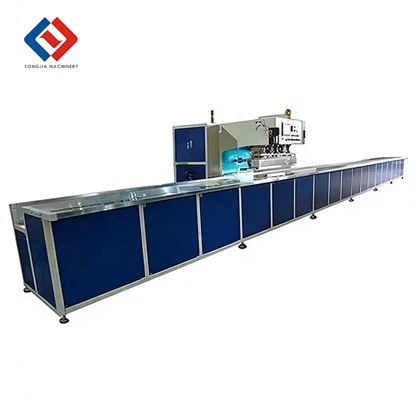
First off, let’s define what “user-friendly interface” actually means here, not some vague marketing term. For a Shuttle Table HF Welding Machine, that’s about two core groups of people: the new operator who’s never used one before, and the veteran welder who runs 10+ hours a day. For the new hire, we don’t want them fumbling with 15 different dials, scrolling through 20 menu screens, or guessing what “parameter 7” does mid-batch. For the vet, we don’t want them to have to take their eyes off the work constantly, or waste 5 minutes adjusting settings because the interface is clunky.
Let’s start with the basics that make or break first-time use. When a new operator unboxes one of our machines, the setup process should be intuitive, right? No complicated cable configurations that require 3 different tools, no software downloads that lock behind a obscure password. The interface is a 7-inch touchscreen (big enough to see from 3 feet away, no squinting) with clearly labeled buttons—no tiny text or icons that look like they belong on a old flip phone. For example, the “weld time” button isn’t a tiny question mark; it’s a big, green button that says “Adjust Weld Duration” right there. We test all our interfaces with people who have zero welding experience, and if they can get a test weld done in under 10 minutes, we know we’re on the right track. Compare that to some cheaper machines out there where the “start” button is hidden behind a menu, and you have to tap 4 times just to run a test—total headache.
Next, the actual operation flow for the shuttle table, which is the whole point of the machine. A Shuttle Table isn’t a fixed unit; it has two tables that slide back and forth: one you load/unload while the other welds. The interface has to control that shuttle movement without any weird glitches. For example, if you’re working with flexible materials like vinyl or nylon, the shuttle needs to stop smoothly, not slam into place and shift your material. Our interface has a one-touch shuttle calibration feature—tap “Calibrate Table” and it runs a quick test move to adjust for your specific material thickness, no manual measurements needed. That’s a big win for small shops that don’t have a dedicated tech on hand to troubleshoot. Also, the interface gives real-time updates right there: how much time left in the current weld, how many parts you’ve run, even a little alert if the material isn’t aligned correctly before the weld starts. No more stopping midway because you misaligned a piece and didn’t see a red warning until you’re half-way done.
Now, let’s talk about the small, daily frustrations that add up over time. If you run a machine 8 hours a day, a clunky interface isn’t just annoying—it slows down production. For example, parameter storage. A lot of welders work with multiple materials: one for banners, one for inflatable boats, one for car seat panels. Some interfaces make you re-enter the weld power, time, and pressure every time you switch materials. That’s 10 minutes of lost time every switch, and if you switch 10 times a day, that’s an hour wasted. Our interface lets you save up to 20 custom presets with just a name (like “Car Seat Upholstery” or “Banners 10ft Wide”)—tap the name and it loads all the settings automatically. No memorizing numbers, no writing them on a sticky note stuck to the machine. Also, the interface has a quick-adjust dial for experienced operators: instead of going through the menu to bump up weld power, you can turn a physical dial right next to the screen that adjusts the value on the display. That’s perfect for someone who knows their setup well and doesn’t want to take their hands off the controls.
But user-friendliness isn’t just about ease of use—it’s also about safety, which ties directly to the interface. HF welding uses high-frequency energy, so safety is non-negotiable. The interface has built-in safety locks that are easy to engage, not some hidden switch. For example, if you’re loading the table, you tap “Safety Lock Engaged” and the shuttle won’t move, and the weld head won’t lower until you tap “Unlock” again. No more accidentally starting a weld while you’re still reaching for material. Also, the interface logs all safety alerts: if there’s a minor issue (like a loose ground connection), it shows a yellow warning with a simple fix ( “Tighten Ground Wire”) instead of a cryptic error code. A lot of cheaper machines have error codes that only a specialist can decode, which means waiting hours for a tech to show up and costing you production money. We make sure our interface’s alerts are in plain English, so the operator can fix it themselves most of the time.
Wait, let’s be real—no interface is perfect, and we’re not trying to pretend ours is. A common complaint from some operators is that the touchscreen can get smudged from vinyl or fabric over time, which makes icons hard to see. So we added a “smudge mode” that makes the text bigger and the buttons bolder, and it’s just a one-tap setting away. That’s the kind of small tweak that makes a big difference. Also, for operators who prefer physical buttons over touchscreen (some veterans like the tactile feedback), we have a set of dedicated, rugged buttons on the side of the machine: start, stop, shuttle move, emergency stop. No more fighting a smudged screen when you need to hit stop fast.
Another angle: scalability. A lot of our customers are small shops that might grow—they start with one machine, then add another. The interface is compatible with remote monitoring, so if you have multiple machines on the floor, you can check all their statuses from a tablet in your office, no need to walk over to each one. That’s a huge plus for shop owners who don’t want to hover over every machine all day. And if you need to update the interface (say, you add a new material type), it’s a over-the-air update—no bringing the machine back to the shop or waiting for a technician to come out.
Let me tie this back to what actually matters to you, the person looking to buy a Shuttle Table HF Welding Machine. When you’re evaluating user-friendliness, don’t just look at the spec sheet for “touchscreen size” or “number of presets.” Think about your team: do you have new hires who need to get up to speed fast? Do you run multiple materials that you switch between constantly? Are you working with space constraints that mean the machine is tight to the floor? Our interface is built for real people doing real work, not just for engineers who design machines.
At the end of the day, a machine is only as good as the people using it. If the interface is so complicated that operators dread running it, you’ll see more errors, slower production, higher staff turnover. That’s why we pour so much time into testing our interfaces with actual welders, not just lab workers. We watch them fumble, we listen to their complaints, and we tweak the design until it solves their problems.
If you’re in the market for a Shuttle Table HF Welding Machine, don’t settle for a machine that comes with a manual longer than a novel. Reach out and we can walk you through the interface in detail, show you how easy it is to switch materials, calibrate the shuttle, and fix small issues on your own. We’re not just selling a machine—we’re selling a tool that makes your day-to-day work easier, and that starts with an interface that works for you, not against you.

You know the drill: if you’re ready to chat through your specific needs, just get in touch to start a procurement discussion. We’d love to help you find the right fit for your production space and workflow.
C Type Welding Machine References
- Industrial Welding Equipment Association. (2022). Operator Interface Design for Commercial Welding Machinery.
- Small Manufacturing Business Survey. (2023). Common Pain Points in Welding Machine Operations.
- Ergonomics Society. (2021). User-Centric Interface Principles for Industrial Equipment.
- Journal of Manufacturing Systems. (2022). Efficiency Metrics for Operator Interfaces in High-Frequency Welding.
Dongguan Yongjia Machinery Equipment Co., Ltd.
We are one of the most reliable shuttle table hf welding machine manufacturers and suppliers in China, specialized in providing high quality customized service. Please feel free to wholesale advanced shuttle table hf welding machine at low price from our factory. For quotation, contact us now.
Address: No. 240, Chashan South Road, Chashan Town, Dongguan City, Guangdong Province, China
E-mail: info@yjwelding.com
WebSite: https://www.yjhighfrequencymachine.com/
